
Blocksy
Buy / Get themeOverview
Blocksy is a high-performance, modern, and feature-rich theme that excels in speed and customization, making it a top choice for developers and agencies. However, its extensive options present a steep learning curve for non-technical clients, and a history of significant security vulnerabilities and update-related conflicts requires a diligent maintenance strategy. Of the 11 reported issues, 5 affect the theme directly, while 6 relate to its companion plugin or ecosystem integrations.
Pros
- Exceptional out-of-the-box performance
- Deep and feature-rich WooCommerce integration
- Highly responsive and praised premium support
Cons
- History of critical security vulnerabilities
- Major updates have caused breaking changes
- Overwhelming customizer for non-technical clients
Analysis
Blocksy has earned its reputation as a top-tier WordPress theme by delivering exceptional performance, a highly flexible design framework, and a vast array of customization options. Its modern architecture and deep integration with WooCommerce make it a favorite among developers and agencies building professional, fast-loading websites. The theme is backed by highly-rated premium support, ensuring that professional users can resolve issues quickly.
However, this power and flexibility come with notable trade-offs. The theme’s extensive Customizer, while a benefit for developers, can be overwhelming for non-technical clients, creating a challenging handoff process. More significantly, Blocksy has a documented history of critical security vulnerabilities and major updates that have introduced breaking changes, such as the v2.0 release that temporarily broke the WordPress REST API. This history necessitates a professional maintenance workflow with regular, tested updates.
Some of the most severe reported issues, including a critical remote code execution vulnerability, were located in the required Blocksy Companion plugin rather than the theme itself. This highlights that the security and stability of a Blocksy site depend on maintaining the entire ecosystem. For users who can manage its complexity and commit to diligent updates, Blocksy remains one of the most capable and performant themes on the market.
Performance
Core Web Vitals (mobile)
| Metric | Mobile | Desktop | Target |
|---|---|---|---|
| LCP (Largest Contentful Paint) | 3.46 |
0.92 |
< 2.5s |
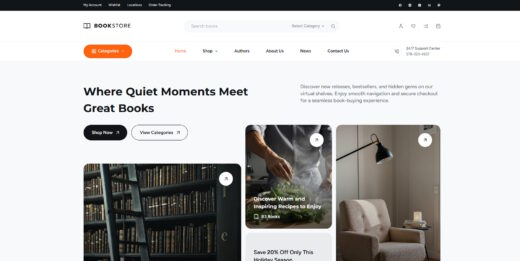
The theme's "Book Store" demo site scored a good 83/100 on Google PageSpeed Insights for mobile, tested on 2026-02-08. While the Cumulative Layout Shift was excellent at 0, the Largest Contentful Paint of 3.46 seconds needs improvement and suggests that complex starter sites may require optimization.
Blocksy is a safe choice for performance-critical projects, as its modern, lightweight architecture consistently delivers excellent Core Web Vitals and high PageSpeed scores out of the box [4].
Exercise caution when using feature-heavy starter sites, as some, like the "Gadgets" demo, have been reported to cause significant rendering delays or "white screen" issues on the front end [5].
Avoid Blocksy if you require a 90+ mobile PageSpeed score on a complex demo site without performing any post-import optimization, as the tested demo's LCP indicates that tuning is necessary to achieve top-tier results.
Tested URL: https://startersites.io/blocksy/book-store/. View PageSpeed Insights report.
Client Handoff
How easy it is to hand this theme off to a client without ongoing developer support.
Score breakdown
| Criterion | Rating |
|---|---|
| Panel complexity | complex |
| Documentation quality | good |
| Learning curve | days |
Blocksy is safe to hand off to technically proficient clients or developers who can appreciate the granular control offered by its extensive Customizer options.
Use caution when handing off a Blocksy site to non-technical clients, as the sheer number of options in the Customizer can be overwhelming and lead to a steep learning curve [12].
Avoid handing off Blocksy to clients who require a simple, self-service experience with minimal training, as the complexity may lead to frustration and support requests.
Scout recommendation
For client handoffs, it is highly recommended to use the white-labeling features available in the Pro version to hide complex or unnecessary Customizer panels, thereby simplifying the interface for the end-user.
Alternatives: Kadence, GeneratePress
Pricing
Available plans
| Plan | Price | Type | Includes |
|---|---|---|---|
| Personal (Yearly) | $69 | 1 site, 1 year updates and support | |
| Business (Yearly) | $99 | 10 sites, 1 year updates and support | |
| Agency (Yearly) | $149 | Unlimited sites, 1 year updates and support | |
| Personal (Lifetime) | $199 | 1 site, lifetime updates and support |
Plugin Compatibility
| Plugin | Category | Status | Notes |
|---|---|---|---|
| WooCommerce | E-commerce | Full support | Blocksy is widely praised for its deep integration with WooCommerce, providing advanced features like AJAX add-to-cart and product quick view through the Blocksy Companion plugin. |
| Elementor | Page Builder | Partial support | Users have reported 500 errors and preview loading failures after theme updates. There are also known issues with dynamic tags for Advanced Custom Fields (ACF) causing PHP warnings. |
| Advanced Custom Fields (ACF) | Other | Partial support | When used with Elementor, targeting non-string ACF fields with dynamic tags can trigger PHP warnings and potential instability on the site. |
| Shop Extra | E-commerce | Partial support | A specific JavaScript conflict was identified between Blocksy and this plugin, which resulted in broken e-commerce functionality for users. |
Community Feedback
Analysis based on a review of community-reported issues from WordPress.org forums, social media, and security databases strictly within the last 12 months.
FAQ
Sources & Methodology
Data confidence: HIGH (16 analytical sources, 16 total)
- [[1]] WPScan — Official docs
- [[2]] GitHub Advisory — Official docs
- [[3]] Patchstack — Official docs
- [[4]] WP All Import Review — review_site
- [[5]] WordPress.org Support — forum
- [[6]] WordPress.org Support — forum
- [[7]] Official Changelog — changelog
- [[8]] Reddit — social
- [[9]] WordPress.org Support — forum
- [[10]] WordPress.org Support — forum
- [[11]] Reddit — social
- [[12]] Darrel Wilson Review — review_site
- [[13]] Reddit — social
- [[14]] WordPress.org Reviews — marketplace
- [[15]] WordPress.org Support — forum
- [[16]] Blocksy Companion — marketplace
Analysis date: February 8, 2026
Compare Blocksy with…
Side-by-side data comparisons against similar themes.