
Elementra
Buy / Get themeOverview
Elementra is a visually stunning theme with a vast demo library, enabling rapid initial deployment. However, it is fundamentally compromised by a history of critical security vulnerabilities, a "pay-to-patch" update model that gates security fixes behind paid support, and severe vendor lock-in that makes it nearly impossible to switch themes later.
Pros
- Visually stunning and high-quality designs
- Extremely fast initial site deployment
- Wide variety of pre-built niche demos
Cons
- Critical security vulnerabilities in core plugin
- "Pay-to-patch" model for security updates
- Severe vendor lock-in via proprietary plugin
Analysis
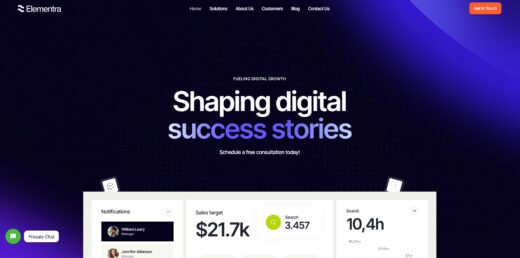
Elementra presents itself as a highly attractive, all-in-one solution for WordPress, boasting a vast library of visually stunning and professionally designed demos. For developers needing to deploy a good-looking site on a tight deadline, the theme offers an undeniable advantage with its “Skins” system, which allows for near-instant setup of niche-specific websites. The front-end editing experience with Elementor is also straightforward, making simple content updates easy for clients.
However, beneath this polished exterior lie significant structural problems that make it a risky choice for any serious project. The theme creates severe vendor lock-in through its required “ThemeREX Addons” plugin, which registers custom post types for content like portfolios and team members. If you ever decide to switch themes, deactivating this plugin will cause that content to vanish, trapping your data within the ThemeREX ecosystem. Furthermore, the theme’s settings are confusingly scattered across multiple areas of the WordPress dashboard, making it a frustrating experience for clients to manage their own site.
The most critical flaw, however, is the developer’s business model regarding security. The theme’s core plugin has a history of critical vulnerabilities, and access to the security patches is tied to a paid support subscription. This “pay-to-patch” policy means that if your support period lapses, your site remains exposed to known exploits unless you pay for a renewal. This practice creates an unacceptable and ongoing security liability, turning the theme from a one-time purchase into a mandatory subscription and a potential ticking time bomb for your website.
Performance
Core Web Vitals (mobile)
| Metric | Mobile | Desktop | Target |
|---|---|---|---|
| LCP (Largest Contentful Paint) | 9.31 |
2.63 |
< 2.5s |
The theme's official demo scored a 59/100 on Google PageSpeed Insights for mobile, which is a poor result. This score is driven by a very slow Largest Contentful Paint of 9.31 seconds and is consistent with community reports of significant code bloat and a high percentage of unused CSS on typical pages [12].
Expect to invest in aggressive optimization, as the theme's mobile PageSpeed score is poor out-of-the-box, and community analysis points to significant code bloat and performance-damaging shortcode patterns that require mitigation [12].
Avoid Elementra for any project where high mobile performance is a key requirement, as the theme struggles to pass core web vitals and its reliance on legacy code patterns makes achieving a good mobile score a significant challenge [12].
Tested URL: https://elementra.themerex.net/. View PageSpeed Insights report.
Client Handoff
How easy it is to hand this theme off to a client without ongoing developer support.
Score breakdown
| Criterion | Rating |
|---|---|
| Panel complexity | complex |
| Documentation quality | basic |
| Learning curve | days |
Elementra is suitable for handoff if the client will only perform basic content edits like changing text and images within the front-end Elementor editor, which remains intuitive for simple tasks.
Use caution when handing off this theme to clients, as the settings are fragmented across the WordPress Customizer, Elementor Site Settings, and a proprietary ThemeREX panel, which can easily confuse users trying to make global changes [5].
Avoid Elementra for projects where the client needs to independently manage theme-level settings, as the confusing dispersal of options for logos, headers, and layouts will inevitably lead to frequent support calls and frustration [5].
Scout recommendation
This theme is not recommended for client handoff. The fragmented settings panel creates a steep and unnecessary learning curve for non-technical users, undermining their ability to manage the site independently.
Alternatives: Kadence, Blocksy, GeneratePress
Pricing
Available plans
| Plan | Price | Type | Includes |
|---|---|---|---|
| Regular License | $59 | Single site, end users not charged |
Plugin Compatibility
| Plugin | Category | Status | Notes |
|---|---|---|---|
| Elementor | Page Builder | Full support | This is the primary page builder the theme is designed and optimized for. |
| WPBakery | Page Builder | Not tested | User reports highlight severe conflicts, including "White Screen of Death" (WSOD) and frozen editor canvases, making it incompatible [6]. |
| WPML / Polylang | Multilingual | Partial support | While compatible, the translation workflow is complex, requiring users to manage strings in three separate locations: WPML, Elementor, and the Theme Options panel [5]. |
Not recommended for sites requiring extensive third-party plugins, especially other page builders or complex WooCommerce extensions, due to a high likelihood of conflicts.
Community Feedback
Analysis based on user reviews, forum discussions, and security advisories.
FAQ
Sources & Methodology
Data confidence: HIGH (16 analytical sources, 16 total)
This analysis combines automated scraping of marketplace data with a manual review of user forums, professional reviews, security databases, and official documentation to identify recurring patterns in user experience, performance, and security.
- [[1]] NVD — Official docs
- [[2]] Reddit — forum
- [[3]] Reddit — forum
- [[4]] Trustpilot — review_site
- [[5]] ThemeREX Documentation — documentation
- [[6]] Reddit — forum
- [[7]] ThemeREX Official — Official docs
- [[8]] GitHub — Official docs
- [[9]] Wordfence — Official docs
- [[10]] SolidWP — Official docs
- [[11]] ThemeREX Support Pricing — Official docs
- [[12]] Ultida — review_site
- [[13]] Colorlib — review_site
- [[14]] YouTube — social
- [[15]] Reddit — forum
- [[16]] ThemeForest — marketplace
Analysis date: February 6, 2026
Compare Elementra with…
Side-by-side data comparisons against similar themes.