
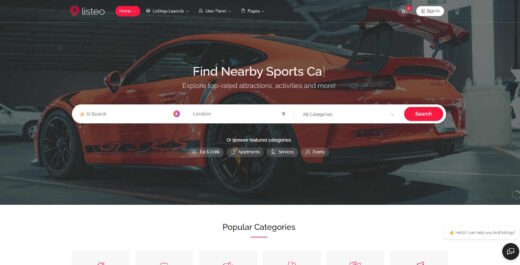
Listeo
Buy / Get themeOverview
Listeo is a feature-rich directory and listings theme that excels at rapid deployment for single-language websites, offering a clean user dashboard and an all-in-one booking system. However, it suffers from significant performance issues on mobile, critical compatibility problems with WPML, and a complex update process that can lead to site-breaking errors. The theme's deep integration also creates a strong risk of "theme lock-in," making future migrations difficult.
Pros
- All-in-one directory & booking system
- Excellent frontend dashboard for users
- Fast setup with one-click demo import
Cons
- Critical WPML compatibility issues
- Poor mobile PageSpeed score
- High risk of "theme lock-in"
Analysis
Listeo is a comprehensive WordPress theme designed to create directory, listing, and booking websites with minimal fuss. Its primary strength lies in its all-in-one package, which includes a booking system, private messaging, and a highly-praised frontend dashboard that allows users to manage their listings easily. This makes it an excellent choice for developers or entrepreneurs who want to launch a feature-complete directory site quickly, especially for clients who value a modern and intuitive user experience.
However, the theme’s integrated nature comes with significant drawbacks. The most critical issue is its poor compatibility with the WPML plugin, making it unsuitable for multilingual projects. Performance is another major concern; the theme is resource-intensive, leading to poor mobile PageSpeed scores and requiring premium hosting to run effectively. Furthermore, the deep integration of its core features creates a strong “theme lock-in,” making it extremely difficult to migrate to another platform in the future.
Ultimately, Listeo is best suited for single-language directory websites where speed-to-market and a polished user dashboard are the top priorities. Prospective buyers must be prepared to invest in high-quality hosting, manage a complex update process carefully, and accept the long-term limitations of being locked into the theme’s ecosystem. If multilingual support, deep customization, or future flexibility are required, exploring alternative plugin-based solutions would be a more prudent choice.
Performance
Core Web Vitals (mobile)
| Metric | Mobile | Desktop | Target |
|---|---|---|---|
| LCP (Largest Contentful Paint) | 2.31 |
1.9 |
< 2.5s |
The official vendor demo scored a poor 46/100 on Google PageSpeed Insights for mobile, tested on 2026-02-03. While Core Web Vitals like LCP (2.31s) and CLS (0) were good, the overall score indicates significant optimization is required for mobile devices. Community feedback corroborates this, noting the theme is "heavy" and can suffer from poor Time to First Byte (TTFB) on budget hosting environments.
Use Listeo with caution if you are targeting a primarily mobile audience, as the theme's official demo scores poorly on mobile PageSpeed tests, suggesting that significant optimization work will be necessary to achieve acceptable loading times. Community analysis points out that the theme's extensive feature set can lead to excessive DOM sizes and slow server response times if not managed carefully.
Avoid Listeo for projects on shared or budget hosting, as user reports indicate that the Time to First Byte (TTFB) can frequently exceed 3,000ms in such environments, leading to a frustrating user experience and potential SEO penalties.
Tested URL: https://listeo.pro/. View PageSpeed Insights report.
Client Handoff
How easy it is to hand this theme off to a client without ongoing developer support.
Score breakdown
| Criterion | Rating |
|---|---|
| Panel complexity | complex |
| Documentation quality | good |
| Learning curve | hours |
Listeo is a safe choice for developers building a directory site for clients who need a clean, modern, and easy-to-use frontend dashboard for managing their own listings. The theme is also well-suited for beginners who want to launch a site quickly, as its one-click demo import and consolidated features minimize the initial setup time.
You should proceed with caution if you plan to heavily customize the theme's appearance, as professionals note its fixed visual structure makes it difficult to implement unique brand identities that deviate from the demo layouts [10]. The theme's options panel is sophisticated, but its complexity grows significantly as you integrate more third-party plugins, potentially overwhelming less experienced users.
Avoid Listeo if your project requires a straightforward migration path in the future, as the theme's deep integration of core functionality creates a significant "theme lock-in" effect that complicates moving data to another system.
Scout recommendation
Listeo is best for single-language directory projects where the client values a polished frontend user experience over deep visual customization. Its all-in-one nature is a strength for rapid deployment but a long-term liability due to theme lock-in.
Alternatives: MyListing, ListingPro
Pricing
Available plans
| Plan | Price | Type | Includes |
|---|---|---|---|
| Regular License | $79 | Single site, end users not charged | |
| Extended License | $2,499 | Single site, end users can be charged |
Plugin Compatibility
| Plugin | Category | Status | Notes |
|---|---|---|---|
| WPML | Multilingual | Limited support | Critical issues reported where translated listings do not sync correctly between categories and multiple active URLs are created for a single translated post, harming SEO. |
| Elementor | Page Builder | Partial support | The theme is built with Elementor, but users report that core homepage widgets can break after simple modifications, requiring support intervention or troubleshooting. |
| Advanced Custom Fields (ACF) | Other | Limited support | ACF fields do not natively integrate with Listeo's frontend submission forms and dashboards, requiring custom PHP code to display and process them. |
| WooCommerce | E-commerce | Partial support | Integration is generally stable for core payment processing, but specific glitches with payment gateways like Stripe Express have been reported and subsequently patched. |
Community Feedback
Analysis based on user reviews, support forums, and social media discussions to identify recurring issues and positive feedback.
FAQ
Sources & Methodology
Data confidence: MEDIUM (13 analytical sources, 15 total)
- [[1]] Listeo Knowledge Base — documentation
- [[2]] Elementor GitHub — Official docs
- [[3]] PureThemes Changelog — documentation
- [[4]] PureThemes Changelog (Old) — documentation
- [[5]] WPML Support Forum — forum
- [[6]] WPML Support Forum — forum
- [[7]] WPML Support Forum — forum
- [[8]] WPML Support Forum — forum
- [[9]] Etsy — marketplace
- [[10]] RadiusTheme Review — review_site
- [[11]] ThemeForest Marketplace — marketplace
- [[12]] Listeo Author Demo — Official docs
- [[13]] ThemeForest Support — Official docs
- [[14]] PageSpeed Test URL — Official docs
- [[15]] ThemeForest Reviews — marketplace
Analysis date: February 3, 2026
Compare Listeo with…
Side-by-side data comparisons against similar themes.