
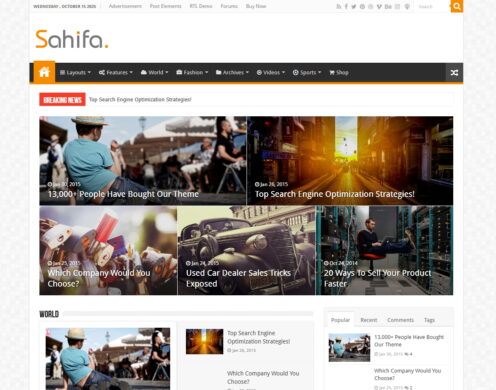
Sahifa
Overview
Sahifa is a long-established and feature-rich theme, making it a highly reliable choice for news or magazine sites, especially those requiring strong right-to-left language support. However, its performance is dated compared to modern themes, and its extensive options panel can be overwhelming for beginners without developer assistance.
Pros
- Excellent RTL and multilingual support
- Reduces plugin needs with built-in features
- Proven stability with a long update history
Cons
- Poor out-of-the-box performance scores
- Limited compatibility with modern page builders
- Overwhelming theme options panel for clients
Analysis
Sahifa is a veteran WordPress theme from ThemeForest, renowned for its stability and comprehensive feature set tailored for news, magazine, and blog websites. For over a decade, it has been a go-to choice for publishers, accumulating nearly 30,000 sales and maintaining a strong user rating. Its classic, content-forward design has proven to be a reliable foundation for countless online publications.
The theme’s most significant advantage is its exceptional support for right-to-left (RTL) languages, making it a premier choice for websites in Arabic, Hebrew, or Persian. It also comes packed with built-in features like a review system, AJAX-powered live search, and social counters, which can reduce the need for installing additional third-party plugins. This all-in-one approach, combined with a history of stable updates that preserve user settings, makes it a dependable workhorse.
However, Sahifa’s age is apparent in several key areas. Its out-of-the-box performance, especially on mobile devices, is poor and requires significant technical optimization to meet modern standards. The theme was created before the rise of page builders like Elementor, so it offers limited compatibility with them. Furthermore, its proprietary theme options panel, while powerful, contains over 200 settings that can easily overwhelm clients or users who are not technically proficient.
Performance
Core Web Vitals (mobile)
| Metric | Mobile | Desktop | Target |
|---|---|---|---|
| LCP (Largest Contentful Paint) | 4.66 |
4.62 |
< 2.5s |
| CLS (Cumulative Layout Shift) | 0.42 |
0.37 |
< 0.1 |
The theme's mobile PageSpeed score is 61/100, tested on the ThemeForest preview environment on 2026-02-22. The mobile Core Web Vitals are poor, with a Largest Contentful Paint of 4.66 seconds and a very high Cumulative Layout Shift of 0.42, indicating significant performance issues out-of-the-box. The theme's hard dependency on jQuery for features like AJAX live search also limits modern JavaScript optimization techniques [6].
You should be cautious if you are building a site where mobile performance is a key priority, as achieving a good PageSpeed score will require significant optimization work beyond the theme's default configuration [6].
Avoid this theme if the project requires excellent mobile performance and fast Core Web Vitals immediately after launch, as the theme's baseline metrics are poor and require expert intervention to improve.
Tested URL: https://preview.themeforest.net/item/sahifa-responsive-wordpress-news-magazine-newspaper-theme/full_screen_preview/2819356. View PageSpeed Insights report.
Client Handoff
How easy it is to hand this theme off to a client without ongoing developer support.
Score breakdown
| Criterion | Rating |
|---|---|
| Panel complexity | complex |
| Documentation quality | basic |
| Learning curve | days |
The project is for a content-focused news or magazine site where the client will primarily be using the WordPress editor and requires minimal design customization post-launch.
You should exercise caution if you are handing the site over to a non-technical client who is expected to manage the site's layout and design, as the 230+ options in the proprietary TiePanel can be overwhelming [7].
Avoid this theme if the end-user requires a simple, modern, and intuitive interface for site management and expects to make significant design changes without ongoing developer support.
Scout recommendation
Sahifa is best suited for developer-led projects where the initial setup is comprehensive. For client handoffs, it's crucial to provide training or a simplified guide to navigate the complex "TiePanel" options panel.
Alternatives: Jannah, Newspaper, Soledad
Pricing
Plugin Compatibility
| Plugin | Category | Status | Notes |
|---|---|---|---|
| Elementor | Page Builder | Partial support | The theme was built with a proprietary page builder and is not designed for Elementor's architecture, requiring workarounds for proper integration. |
| WooCommerce | E-commerce | Partial support | While the theme is compatible, some users report that having WooCommerce active can lead to a sluggish backend admin dashboard. |
| Wordfence | Security & Backup | Partial support | A historic report noted a conflict where Wordfence's 2FA could break the login functionality, though the root cause was not definitively established. |
| WPML | Multilingual | Full support | Officially marked as "Multilingual Ready" and is highly recommended in the community for its robust RTL and multilingual support. |
Community Feedback
Analysis based on user reviews, support forums, and social media discussions.
FAQ
Sources & Methodology
Data confidence: HIGH (21 analytical sources, 21 total)
This analysis is based on a combination of official documentation, marketplace data, independent reviews, and public discussions on forums and social media.
- [[1]] Reddit — social
- [[2]] Reddit — social
- [[3]] WPML — Official docs
- [[4]] BeginDot — review_site
- [[5]] Reddit — social
- [[6]] YouTube — social
- [[7]] Design Bombs — review_site
- [[8]] YouTube — social
- [[9]] TieLabs — documentation
- [[10]] TieLabs — documentation
- [[11]] PluginUs.net — forum
- [[12]] WordPress.org — forum
- [[13]] ThemeSupport — review_site
- [[14]] Reddit — social
- [[15]] Colorlib — review_site
- [[16]] TieLabs — Official docs
- [[17]] ThemeForest — marketplace
- [[18]] ThemeForest Reviews — marketplace
- [[19]] TieLabs Docs — documentation
- [[20]] TieLabs Support — Official docs
- [[21]] ThemeForest Preview — Official docs
Analysis date: January 23, 2026
Compare Sahifa with…
Side-by-side data comparisons against similar themes.