
Soledad
Buy / Get themeOverview
Soledad is a massively popular and feature-rich theme, ideal for content-heavy magazine or blog websites that need a professional design out of the box. However, its extensive options create a steep learning curve for beginners, and a documented history of critical security vulnerabilities requires diligent maintenance and immediate updates.
Pros
- Extensive pre-built demo sites
- Highly customizable for magazine layouts
- Good technical support response times
Cons
- History of critical security vulnerabilities
- Overwhelming options panel for beginners
- Can be bloated and slow if not optimized
Analysis
Soledad is one of the best-selling magazine and blog themes on the market, celebrated for its vast library of professional, “pixel-perfect” demo sites that can be imported with a single click. It offers an incredible depth of customization options, allowing developers to build visually rich, content-heavy websites for nearly any niche. The theme also provides responsive and reliable technical support and includes strong integrations for advanced features like custom post types with Toolset, making it a powerful tool for complex projects.
However, this power comes with significant trade-offs. The theme’s most serious drawback is its documented history of critical security vulnerabilities, which have included flaws allowing site takeover. This makes it imperative for users to apply security patches the moment they are released. Furthermore, the sheer number of options in the admin panel creates a steep learning curve and can be overwhelming for beginners or clients, often leading to a frustrating user experience. While vendor demos show good performance, real-world sites often suffer from bloat and slower speeds compared to more lightweight alternatives.
Ultimately, Soledad is best suited for experienced developers or agencies who can manage its complexity and mitigate its risks. It’s a strong choice for those who need its specific design capabilities and are prepared to implement a rigorous update and maintenance schedule, including testing all updates on a staging site. Beginners, or those looking for a simple, low-maintenance solution, should consider more streamlined and performance-focused alternatives.
Performance
Core Web Vitals (mobile)
| Metric | Mobile | Desktop | Target |
|---|---|---|---|
| LCP (Largest Contentful Paint) | 1.93 |
1.77 |
< 2.5s |
| CLS (Cumulative Layout Shift) | 0.06 |
0.01 |
< 0.1 |
The official vendor demo achieved a good mobile PageSpeed score of 84/100 with a fast 1.93s LCP and excellent 0.06 CLS when tested on 2026-02-22. While this demonstrates strong potential, community reviews frequently report that real-world sites with more content and plugins can experience bloat and slower load times compared to lightweight competitors [4].
The theme is a safe choice for projects where performance is important, as the official demo scores well on Core Web Vitals and shows that good optimization is achievable with proper configuration.
Use caution when activating numerous features and plugins, as third-party reviews indicate the theme can become bloated, with load times potentially double that of high-performance alternatives like Astra [4].
Avoid Soledad for projects where top-tier, out-of-the-box performance is the absolute highest priority without any optimization effort, as achieving the benchmark scores requires careful setup.
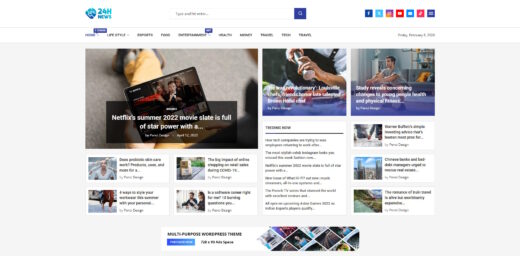
Tested URL: https://soledaddemo.pencidesign.net/24h-news-magazine/. View PageSpeed Insights report.
Client Handoff
How easy it is to hand this theme off to a client without ongoing developer support.
Score breakdown
| Criterion | Rating |
|---|---|
| Panel complexity | complex |
| Documentation quality | good |
| Learning curve | days |
This theme is safe to hand off to technically proficient clients or internal teams who have prior experience with complex, multipurpose WordPress themes and understand the importance of ongoing maintenance.
Exercise caution when handing Soledad off to clients with limited WordPress experience, as the sheer number of options in the theme panel can be overwhelming and lead to support requests [4].
Avoid handing this theme off to beginner clients who will be managing the site themselves, because the steep learning curve and complex settings are likely to cause significant frustration and misconfiguration [4].
Scout recommendation
Soledad is best suited for developers or agencies building a site for a client and providing ongoing support, rather than for a "set it and forget it" handoff. The complexity that allows for deep customization also makes it challenging for non-technical users to manage effectively.
Alternatives: Newspaper, Astra, GeneratePress
Pricing
Available plans
| Plan | Price | Type | Includes |
|---|---|---|---|
| Regular License | $59 | Single site, end users not charged | |
| Extended License | $2,200 | Single site, end users can be charged |
Plugin Compatibility
| Plugin | Category | Status | Notes |
|---|---|---|---|
| Elementor | Page Builder | Partial support | The theme supports and bundles an add-on for Elementor, but updates have been needed to fix breaking changes from new Elementor versions, particularly with post builders [5]. |
| Yoast SEO | SEO & Marketing | Limited support | Users report that the content analysis feature frequently fails to detect text and gives a "0 words" count for pages built with the theme's custom blocks [6]. |
| Rank Math | SEO & Marketing | Limited support | Similar to Yoast, Rank Math's SEO analysis tools often cannot parse content within the theme's proprietary page-building elements, leading to inaccurate scores [6]. |
| Toolset | Other | Full support | The theme is officially optimized for Toolset, supporting advanced features like radius-based Google Maps searches and front-end submission forms for custom post types [7]. |
| Caching Plugins | Caching & Performance | Partial support | Caching conflicts are a frequent source of "ghost bugs," where settings appear not to save or the admin interface looks broken, requiring users to clear caches to resolve. |
| WooCommerce | E-commerce | Full support | The theme is marketed as a WooCommerce theme and includes extensive styling options and features for building online stores. No major compatibility issues were found in the analysis. |
Community Feedback
Pain points were identified from security databases, independent reviews, and public support forums.
FAQ
Sources & Methodology
Data confidence: MEDIUM (10 analytical sources, 11 total)
This analysis is based on a combination of scraped marketplace data, official documentation, independent reviews, and user discussions from public forums and social media.
- [[1]] Patchstack — review_site
- [[2]] WPScan — review_site
- [[3]] Patchstack — review_site
- [[4]] Darrel Wilson Review — review_site
- [[5]] Official Changelog — Official docs
- [[6]] ACF Support Forum — forum
- [[7]] Official Documentation — documentation
- [[8]] ThemeForest Support — marketplace
- [[9]] Soledad Theme Landing Page — Official docs
- [[10]] SaaS Scout Comparison — review_site
- [[11]] ThemeForest — marketplace
Analysis date: February 6, 2026
Compare Soledad with…
Side-by-side data comparisons against similar themes.