
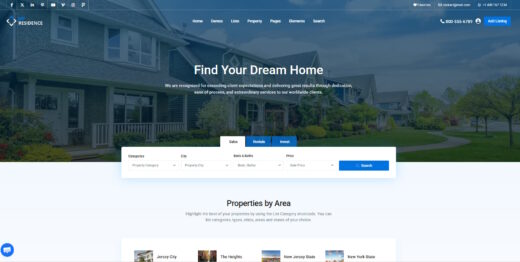
WP Residence
Buy / Get themeOverview
Residence is a feature-packed and highly customizable real estate theme that has been on the market for many years, offering deep integration with Elementor and WPML. However, its extensive options create a steep learning curve, and it suffers from significant performance issues, particularly with large property databases and complex map searches.
Pros
- Extensive real estate features
- Over 150 custom Elementor widgets
- Officially certified as WPML compatible
Cons
- Poor mobile performance scores
- Steep learning curve with 400+ options
- Known conflicts with popular plugins
Analysis
Residence is a long-standing and immensely popular real estate theme on ThemeForest, known for its exhaustive feature set tailored specifically for property listings, agencies, and agents. It offers deep customization capabilities through its support for both WPBakery and Elementor, providing over 150 dedicated real estate widgets for the latter. This allows developers to build highly specific and complex property websites without needing to write custom code. The theme is also officially certified by WPML, making it a reliable choice for creating multilingual real estate portals.
Despite its power, the theme’s greatest strength is also its weakness. With over 400 options in its admin panel, Residence presents a steep learning curve that can be overwhelming for clients and even some developers. This complexity contributes to significant performance challenges. The theme’s official demo struggles with mobile speed, and users frequently report severe slowness, especially when dealing with large numbers of properties and using the integrated Google Maps feature. This often necessitates investment in high-performance hosting and professional optimization to meet modern web standards.
Furthermore, while the theme is actively updated, these updates can sometimes introduce friction. Users must be diligent about process, such as reactivating the license after every update to prevent site-breaking errors. There are also documented conflicts with essential plugins like Yoast SEO and even some caching bugs with WPML. Agencies considering Residence should be prepared to invest time in learning its intricacies and budget for the robust infrastructure required to run it effectively, as it is a powerful but demanding tool.
Performance
Core Web Vitals (mobile)
| Metric | Mobile | Desktop | Target |
|---|---|---|---|
| LCP (Largest Contentful Paint) | 10.7 |
0.92 |
< 2.5s |
The vendor's main demo scored 62/100 on Google PageSpeed Insights for mobile, which is in the "needs work" category. The primary issue is a very poor Largest Contentful Paint of 10.7 seconds, indicating significant delays in loading the main content for mobile users.
This theme may be suitable for projects on high-performance hosting where developers can implement aggressive caching and optimization, as the theme includes a built-in caching system to help mitigate some database load [5].
Proceed with caution, as the theme is known to have severe performance issues with large property inventories, particularly with Google Maps and complex search filters that create slow database queries [1, 3].
Avoid this theme for websites on standard shared hosting or for projects that will feature thousands of properties, as the high mobile LCP score and user reports of slowness indicate it will likely fail to meet Core Web Vitals standards without expert intervention.
Tested URL: https://main.wpresidence.net/. View PageSpeed Insights report.
Client Handoff
How easy it is to hand this theme off to a client without ongoing developer support.
Score breakdown
| Criterion | Rating |
|---|---|
| Panel complexity | complex |
| Documentation quality | good |
| Learning curve | days |
This theme is a safe choice for agencies with development resources who can dedicate time to learning its complex backend and optimizing its performance for clients.
Use caution when handing this theme off to non-technical clients, as the backend contains over 400 theme options which can be overwhelming without proper training and documentation [10].
Avoid this theme if your client needs to manage the site independently with minimal training, as the lack of a backend demo before purchase makes it impossible to assess its usability for their specific needs [18].
Scout recommendation
This theme is best suited for agencies or developers building a site for a client, not for DIY users. A comprehensive training package should be included in the project scope to ensure the client can manage their listings effectively.
Alternatives: Houzez, RealHomes
Pricing
Available plans
| Plan | Price | Type | Includes |
|---|---|---|---|
| Regular License | $79 | Single site, end users not charged | |
| Extended License | $2,950 | Single site, end users can be charged |
Plugin Compatibility
| Plugin | Category | Status | Notes |
|---|---|---|---|
| Elementor | Page Builder | Full support | The theme is heavily integrated with Elementor and includes a dedicated "WpResidence Elementor Studio" with over 150 custom widgets. |
| WPML | Multilingual | Partial support | Although officially certified as fully compatible [15], a known caching bug can prevent translated content from displaying correctly without manual intervention. |
| Yoast SEO | SEO & Marketing | Partial support | A significant conflict has been reported where activating Yoast SEO can cause the theme's taxonomy/category editor to disappear from the WordPress admin area. |
| WP All Import | Other | Partial support | The theme's import add-on requires the base WP All Import plugin, but the error messaging can be confusing for users who don't realize this dependency. |
| WooCommerce | E-commerce | Full support | The theme officially supports WooCommerce for handling payments, such as for property submissions or featured listings. |
Community Feedback
Analysis based on user reviews, support forums, and social media discussions.
FAQ
Sources & Methodology
Data confidence: HIGH (20 analytical sources, 21 total)
This analysis is based on a combination of scraped data from the theme's official marketplace page, vendor documentation, and a review of public discussions on forums and social media.
- [[1]] Freelancer Job Post — social
- [[2]] WPResidence Change Log — documentation
- [[3]] Database query – How the theme works — documentation
- [[4]] If demo content import fails — documentation
- [[5]] How to improve my website speed — documentation
- [[6]] How to get support — documentation
- [[7]] White Screen. The site is experiencing technical difficulties. — documentation
- [[8]] WPResidence / WpEstate LinkedIn Page — social
- [[9]] Reddit - Why Does Everyone Hate Elementor? — social
- [[10]] ThemeForest Item Page — marketplace
- [[11]] WordPress.org - WPResidence Add-On requires WP All Import — forum
- [[12]] WordPress.org - Problem description category Yoast Seo — forum
- [[13]] WpEstate Blog - WP Residence v.1.40 — Official docs
- [[14]] WpEstate Blog - 9 Successful SEO tips — Official docs
- [[15]] WPML Theme Compatibility Listing — documentation
- [[16]] WPML Support Forum - WPML + WPResidence theme issues — forum
- [[17]] WP Property Feed Support - Wp Residence, WP Connector and Jupix Feed SEO — documentation
- [[18]] WpResidence FAQ — Official docs
- [[19]] Official Site - WpResidence Theme — Official docs
- [[20]] WpResidence Site Articles - WordPress SEO After SGE — Official docs
- [[21]] ThemeForest — marketplace
Analysis date: February 3, 2026
Compare WP Residence with…
Side-by-side data comparisons against similar themes.